Online GST Return Filing: A Step-by-Step Guide, for Businesses
Learn how to file GST returns in India. Understand GSTR-1, GSTR-2B GSTR-3B ITC reconciliation, tax payments, Nil returns and filing deadlines.


In this Article
Stepwise Process to File GST Returns on the GST Portal: A Complete Guide for Businesses
Filing GST returns is a standard compliance obligation for companies registered under the Indian Goods and Services Tax system. Be it a startup, a growing business, or an established firm, knowing about GST Return Filing Online enables businesses to file transactions correctly, claim Input Tax Credit (ITC) wherever applicable and avoid penalties.
The GST portal has made it possible for registered taxpayers to file returns, mention tax dues on outward supply, track purchases, pay dues and monitor the return status on the GST portal. But filing a return is not as simple as filling out the form with numerical values. For filing returns properly, businesses should ensure they have accurate records of sales and purchases, supplier’s invoice confirmation, tax liability calculation, and ensure timely filing.
This guide provides a complete stepwise process for GST return filing, including GSTR-1, Invoice Furnishing Facility (IFF), GSTR-2B, GSTR-3B, return payment, Nil returns, and common filing mistakes.
What is GST Return Filing?
GST return filing is the practice of declaring one's various transactions and tax-related details to the authorities. Based on the type of registration of the taxpayer and its operation, a taxpayer may be required to file different types of returns.
In the case of normal taxpayers, two prominent returns are as follows:
GSTR-1: It contains all the details related to the supplies made by the taxpayer, including sales of goods and services.
GSTR-3B: This is a return that provides a picture of the total tax liability and eligible input tax credit of a taxpayer.
Apart from these returns, there is also GSTR-2B, which is an auto-generated statement showing the eligible ITC. It should be noted that GSTR-1 and GSTR-3B are different types of filing forms, and filing one does not substitute for filing the other.
Who Should File GST Returns?
Both taxpayers and individuals must file the required returns depending on the type of their registration, even if no sales take place in any particular tax period.
The types and frequency of returns depend on the following factors:
The type of a taxpayer’s registration under the GST system and the subsequent application of their registration.
Aggregate annual turnover
The choice of a registered taxpayer to select the QRMP scheme,
The nature of transactions conducted,
If registered under a special category such as the composition scheme.
Regular taxpayers, whose total turnover does not exceed 5 crore in any particular year, if they meet all conditions provided for by the QRMP scheme, may apply to it. The taxpayers would file GSTR-1 and GSTR-3B on a quarterly basis. Payments are usually made every month.
The filing option may be selected through the GST portal(Services > Return > Opt-in for Quarterly Return).
It is highly recommended for businesses to verify the required filing frequency and return before
submission.
GST Return Submission Deadlines: Information for Companies
Deadline for GST submission depends upon how frequently GST is filed, the kind of GST return filed and the applicable notifications.
In case of normal taxpayers, the timelines described hereunder generally apply:
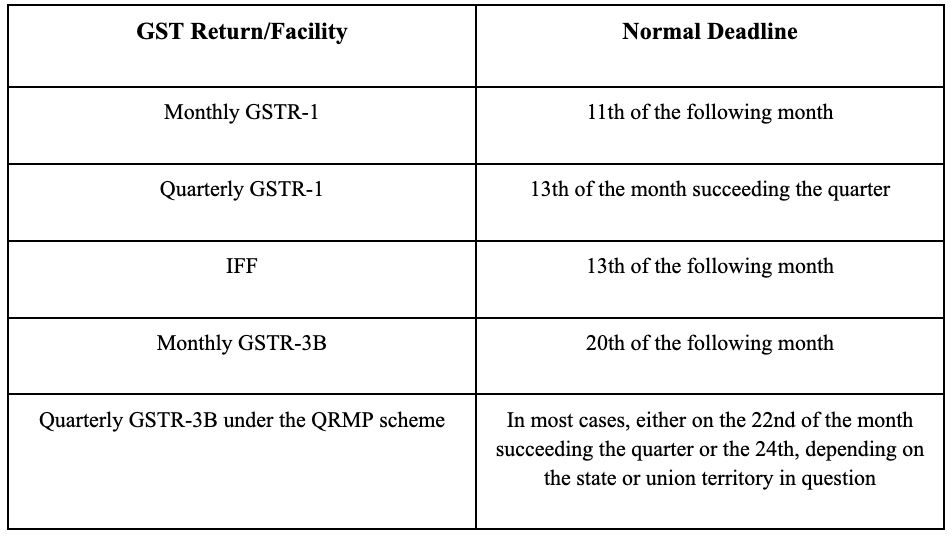
This information is general and subject to change by government orders or extensions. GST portal should always be consulted for the due date of the respective return for each tax period.
In respect of the GSTR-3B filing dates for QRMP taxpayers, it is determined by the location of their principal place of business. For instance, the state of Telangana falls under the group assigned the due date of the 22nd of the month following the quarter.
The QRMP scheme mandates the qualified taxpayers to carry out monthly tax payments by means of a government-approved challan.
How to Submit GST Returns via the Internet: A Procedure in Easy Steps?
GST Portal serves as a hub for taxpayers that enables them to have access to forms for returns, deadlines and the progress of the filing process.
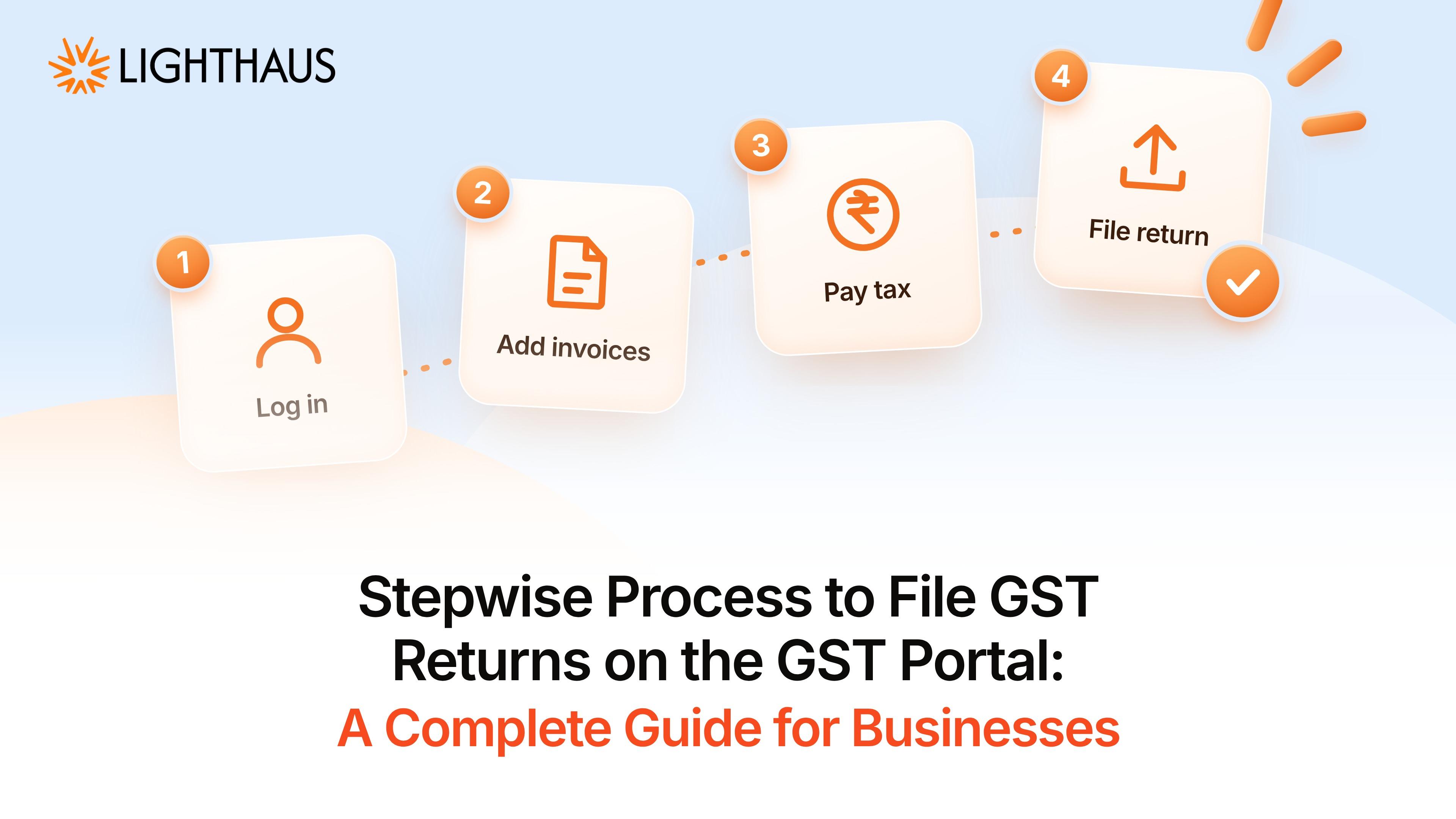
These are the steps your business needs to take to file your GST Returns.
Step 1: Access the GST Portal
Visit the GST Portal at https://www.gst.gov.in/ and log in with your credentials.
After you log in:
Go to Services.
Choose Returns.
Select Returns Dashboard.
Choose the period in which returns are required to be filed and the relevant financial year.
Click on Search.
The dashboard shows the status of returns to be filed under your GSTIN number along with the due dates.
Businesses should keep checking this dashboard regularly in order to keep a watch on the pending returns and avoid missing the deadlines.
Step 2: Comprehend How Your GST Dashboard and Return Calendar Operate
GST Returns Dashboard helps users to know a range of returns that have to be filed for a chosen tax period.
In addition, taxpayers understand the following with the help of this dashboard:
Types of returns applicable to their registration under the GST.
Frequency of filing the returns.
Dates by which returns should be filed.
The status of the return being filed: pending, submitted or already filed.
Finally, there are options to fill in the returns either online or offline via various tools.
Moreover, a return calendar aids businesses in scheduling their monthly compliance requirements.
For instance, an organization that is filing GST returns every month can structure its workflow around the following:
Finalising customer invoices and credit notes before the period of GSTR-1.
Checking GSTR-2B and matching purchase invoices after the supplier submits the returns.
Assessing tax liability and confirming eligible input tax credit before preparing GSTR-3B.
Settling tax dues and filing the return before the deadline.
A structured return calendar allows minimizing chances of missing invoices, forgetting tax liabilities and delaying payments.
Step 3: Preparation and Submission of GSTR-1
GSTR-1 is the document used to highlight the outward supplies made within the given tax period.
Such a document covers the following information:
B2B invoices
B2C transactions
Credit and debit notes
Supplies for export
Other types of details associated with outward supplies
To file the GSTR-1 form:
1. Visit the Returns dashboard
2. Select the right tax period and financial year
3. Find the GSTR-1 tile
4. Click on Prepare Online
5. Fill in the required invoice and sales data
6. Double-check the provided information
7. Generate and review the summary of the document
Companies issuing a significant number of invoices can opt for offline tools provided by the GST Portal or use integrated methods.
Step 4: Make Use of IFF if You Are Registered Under the QRMP Scheme
The Invoice Furnishing Facility (IFF) is an optional facility offered to eligible taxpayers who choose the QRMP scheme.
It helps quarterly filers submit details about certain outward supplies in the course of the first two months of each quarter.
For instance, a firm that follows the April to June quarter can make an IFF application for the months of April and May for reporting valid invoices during those months rather than relying on the quarterly GSTR-1 filing.
Here are some important points regarding the IFF:
IFF is optional, not compulsory.
It can be used only in the two months of the quarter.
Only certain invoices and accompanying documents can be included in the IFF.
The IFF needs to be filed on the 13th of the month after the reporting month.
The information already given in the IFF need not be repeated in the quarterly GSTR-1.
The IFF should be used only by those businesses who find early reporting necessary for their customers and business relationships.
Stage 5: Examination of GSTR-2B Before Application of Input Tax Credit
It is critical for any entity filing a GST return to examine the Input Tax Credit (ITC). By utilizing the ITC benefit, registered people can avail of the credit of taxes paid on product purchases as per the provisions of the GST Act.
In this respect, GSTR-2B is generated by means of documents from vendors and other prescribed sources about the ITC.
This document provides assistance to users in analyzing various aspects, such as:
The invoices from suppliers.
Debit/Credit notes.
Disallowed ITC.
Import-related credit particulars.
To get GSTR-2B, one needs to:
Log into the GST Portal.
Go to Services > Returns > Returns Dashboard.
Choose the appropriate financial year and tax period.
Find the title of GSTR-2B.
Access or download it.
How to Reconcile GSTR-2B with your Purchase Register:
A thorough process for the reconciliation would consist of:
1. Confirm supplier GSTINs
Check if the GSTIN of the purchase register tallies with the GSTIN reported in the returns.
2. Validate the invoice data
Cross-check the purchase data such as invoice numbers and dates and taxable values.
3. Detect missing invoices
If the qualifying purchase invoice was not found in GSTR-2B, inquire if the supplier has mentioned this in their returns correctly.
4. Consider credit notes and debit notes
Make sure that the amendments are properly recorded and there is no overstatement of ITC.
5. Verify ITC eligibility
Not all purchases qualify for the ITC by default. The companies must look into the relevant GST terms that mention the blocked credits and other governing factors.
6. No duplicate ITC claims
Make sure that the invoice or credit is being claimed just once.
7. Review reversals and reclaim entries
It is important to take note of ITC eligible for reversal or recovery subject to the applicable rules.
The GST Portal has also made the task less difficult by providing system-generated entries from GSTR-2B for some of the necessary entries to be filled in GSTR-3B. Businesses must not consider these pre-filled amounts as sufficient for conducting reconciliation and eligibility verification.
Step 6: Fill Out and Submit GSTR-3B
GSTR-3B is a summary return through which regular taxpayers submit their information regarding outward and inward supplies, tax liabilities, eligible input tax credit (ITC) and other important information.
In contrast to GSTR-1 that notifies details relating to outward supply, GSTR-3B represents an overall picture of tax liability of the taxpayer for the given tax period.
To submit GSTR-3B:
1. Access Services > Returns > Returns Dashboard.
2. Pick out the corresponding financial year and tax period.
3. Find the GSTR-3B tile.
4. Hit the Prepare Online button.
5. Check auto-filled details, if available.
6. Fill in or confirm relevant details about outward and inward supply.
7. Check eligible ITC and required reversal.
8. Simulate tax payable under proper headings of tax.
9. Preview draft return.
10. Make necessary payments and settle the corresponding debts.
11. Submit return with the help of either DSC or EVC as necessary.
Before submitting the form, companies should ensure that data contained in GSTR-3B correspond with data of their sales and purchase reports as well as GSTR-1 data and GSTR-2B reconciliation report.
What Are the Important Points to Be Considered before Filing GSTR-3B?
One should give prior importance to the following aspects before filing GSTR-3B:
Output taxable supplies.
Exempt, nil-rated and non-GST supply, where applicable.
Inward supplies subject to reverse charge.
Eligible ITC.
ITC reversals or non-eligible credits.
Levies under CGST, IGST and SGST along with cess.
Interest and late fees, if any.
Since once filed GSTR-3B will be the part of tax compliance records of the taxpayer, hence it is extremely important to check the draft thoroughly before submitting it.
Step 7: Make Payments and Generate Challans
Once the GSTR-3B is prepared, it is important for businesses to pay off their tax dues. The GST portal allows the users to issue Challans and pay their taxes.
The GST Portal has a facility for online payments enabling taxpayers to generate their challan and discharge their liability.
Payment Process:
Go to the payment section of the return.
Check the tax liability and available balances.
Choose a mode of payment.
If any balance in cash is required, then a challan is generated which must be of form GST PMT-06.
Pay with the mode of payment available as necessary.
Finally, confirm if the amount has got posted in the electronic cash ledger.
Use available cash and credit balances to either discharge liability applicable.
Companies must appreciate the difference between these two principal electronic ledgers.
Electronic Cash Ledger
In this ledger, the taxpayer’s deposit, in terms of cash, into the GST system is recorded. The amount deposited may be used in meeting the tax liabilities, interest, penalty, late fee, etc., under the GST forum.
Electronic Credit Ledger
This ledger records the eligible credit, that is, Input Tax Credit, available to the taxpayer. This credit may be used in discharging any tax liability subject to utilization rules under GST.
These two ledgers cannot be used interchangeably for payments. For example, ITC cannot usually be used in settling interest or late fees. The above-mentioned amounts are generally to be settled through the electronic cash ledger only.
Once the liabilities have been set off, the taxpayer may proceed with filing GSTR-3B.
Important: Generating a challan or depositing money in an electronic cash ledger does not in itself mean that the GST return is filed.
How to Do Nil GST Return Filing via SMS
Businesses that do not perform any operations in the tax period may still be compelled to file their return.
Taxpayers can avail the option of filing Nil GSTR-3B through SMS.
A Nil GSTR-3B can be filed through SMS only in the event of the taxpayer:
Having made no outward supplies in the specified period.
Receiving no inward supplies in that period.
Having no outstanding/GST payable for the period.
Failing to meet the set parameters of Nil filing.
The process is accomplished by two SMS.
The first step is the Nil Return Filing initiation.
You need to send the SMS to the number 14409, with the text as follows:
NIL 3B GSTIN MMYYYY.
You are to replace GSTIN with the GSTIN of the business and MMYYYY with the corresponding tax period.
The next step is the confirmation of the filing.
After that, you get a code, and you send the confirmation SMS in the following format:
CNF 3B CODE.
This is how you will get the acknowledgement number (ARN) if you have sent the Msg successfully.
Once you have the ARN, you can use it further to see the status on GST Portal.
If your company has sales, purchases, tax liabilities, or any other transactions under the requirement of reporting, you cannot conclude that you are eligible for Nil return by default, without checking the necessary conditions.
Late fees and Interest on delayed filing of GST returns
It is extra monetary liability that arises mainly due to non-filing of timely GST returns.
Late fees and interest are two ways in which a delayed filing could have grave consequences.
1. Late Fees
According to Section 47 of the CGST Act, “A registered taxpayer shall be liable to pay a late fee, if such person does not furnish the applicable returns or statements within the prescribed time.”
This law mentions that for any delay, the highest rate of late fees shall be ₹100 per day for a particular class of late filings, thereby allowing a prescribed maximum amount. The applicable late fees could depend on the type of return, turnover, government notifications, and applicable concessions.
The companies should take the late fee calculated on the GST Portal rather than relying on the same amount being applicable on all returns.
2. Delay in tax payment incurs interest.
According to section 50 of the CGST Act, interest will be applicable when the tax remains unpaid, despite the due date being over. The generally prescribed interest rate for tax delay is 18% per annum, according to applicable provisions.
Interest shall also apply to the incorrectly taken and utilized input tax credits at the separately specified rates in accordance with relevant provisions.
The actual amount varies according to the tax liability, payment date, and applicable rules.
How to prevent businesses from incurring late fees and interest
The following simple steps can assist businesses in ensuring timely GST compliance:
Use a monthly calendar to keep track of GST due dates.
Finalize sales and purchases by the time returns need to be filed.
Verify purchases against GSTR-2B each time before filing the returns.
Reserve cash for GST payments.
Check status of all outstanding and filed returns for all GSTINs.
Keep track of GST payments and cash flow related to taxes.
The timely filing of GST returns is not only about avoiding fines. Being able to submit returns on time means that your organization will have accurate records for tax payable and avoid any complications related to compliance.
Common mistakes when filing GST returns and how to fix them
Here are the key errors businesses can make while filing GST returns even with a well-structured accounting process.
While some mistakes can be fixed by using amendment facilities available for returns, some may also need corrections in future tax periods or according to some prescribed procedures.
Below are the most common mistakes businesses need to keep an eye on.
1. Wrong GSTIN or Invoice details
If a business incorrectly enters GSTIN, invoice number, date, or taxable amount, there can be mismatches between the records of suppliers and buyers.
In order to avoid this mistake, you should verify GSTIN and Invoice details of customers with sales records before filing GSTR-1.
2. Missing Sale Invoices
In case you do not include an invoice in GSTR-1, these reported outward supply details will not match the actual records of the business.
To correct the mistake, if applicable, you can use GSTR-1A to add and amend information related to the same tax period after the filing of GSTR-1 but before filing the respective GSTR-3B, otherwise, you can use the relevant process of changes for the subsequent periods as per applicable limits.
3. Wrong ITC Claims
Making an ITC claim without confirming GSTR-2B, qualifications, or restrictions can result in compliance problems. How to prevent this: Make a comparison of purchase bills with GSTR-2B and check ITC eligibility before reporting credit in GSTR-3B.
4. Difference Between GSTR-1 and GSTR-3B
The difference between the outward supply in GSTR-1 and tax liabilities in GSTR-3B will raise issues.
How to prevent this: Compare sales records, GSTR-1, and GSTR-3B before submitting. Find the reasons for discrepancies regarding taxable value and tax liability.
5. Incorrect Tax Head Choice
Using a wrong tax head, e.g., using IGST instead of CGST and SGST, can compromise the correctness of the return. How to prevent this: Check the location of supply and tax treatment before completing the return.
6. Forgetting to Settle the Liability
Preparing the challan and giving the money to the electronic cash ledger does not guarantee that the payment process will be finalized.
How to prevent this: Verify electronic cash and credit ledger details, settle liability, and assure that return status is Filed.
7. Filing a Nil Return Even Though There Were Reportable Transactions
A business might wrongly think that it can file a Nil return because it did not make any sales even though it received purchases or had reportable transactions.
How to avoid it: Look at. Inward supplies and outward supplies, tax liability and the conditions that allow for a Nil return before filing.
8. Thinking That a Submitted Return Is a Filed Return
Saving or submitting return details is not the same as finishing the filing process.
How to avoid it: Check the status of the return on the GST Portal. Download the filed return and the acknowledgment, for your records.
How Businesses Can Make GST Return Filing More Efficient
When a business grows I think GST compliance becomes more demanding. Higher transaction volumes, many sales channels, supplier invoices, credit notes, marketplace settlements and several GST registrations can make reconciliation very hard.
A structured accounting and compliance process can help a business manage this complexity.
Here are a few ways to improve this process:
Maintain organised transaction records:
Keep sales invoices, purchase bills, credit notes, debit notes and payment records updated throughout the month of waiting until the filing deadline.
Reconcile regularly:
Compare accounting records with GSTR-1, GSTR-2B and GSTR-3B to find mismatches before they become recurring issues.
Track compliance across GSTINs:
A business operating in multiple states should keep a separate filing calendar and reconciliation process for each GST registration.
Review exceptions before filing:
Missing invoices, duplicate entries, incorrect tax rates and ITC mismatches should be investigated before the return is submitted.
Keep an audit trail:
Store filed returns, challans, acknowledgements and reconciliation records for reference.

Find your gap before month-end
We'll reconcile one month of settlements against your orders. No commitment.
Conclusion
GST return filing is a must for any business that wants to stay compliant in India. It involves steps like reporting sales in GSTR-1, checking input tax credit with GSTR-2B and paying taxes using GSTR-3B. Each of these steps depends on having correct records and acting on time.
The best approach is to see GST compliance not as a rush but as a regular part of business operations. When businesses keep invoices organized, match their records, often check tax amounts carefully and stay aware of return dates the process of filing GST returns online becomes simpler and more accurate.
For businesses that are growing, having a system for accounting and compliance helps them understand their tax obligations better. It also gives them insight into cash flow and financial health.
FAQs
1. How can I file GST returns online?
You can file GST returns online by visiting the GST Portal at www.gst.gov.in. Once logged in go to Services then choose Returns and click on Returns Dashboard. Select the year and the tax period you want to file for. Prepare the return that applies to your situation, check all the details carefully, pay any taxes you owe and then file the return using either a Digital Signature Certificate (DSC) or an Electronic Verification Code (EVC) depending on what you have.
2. What is the difference between GSTR-1 and GSTR-3B?
GSTR-1 is a return that shows all your supplies, such as sales invoices, credit notes, debit notes and other required details about your sales. GSTR-3B is a summary return used to report your tax obligations, the input tax credit you are claiming and the tax you have paid during a tax period.
3. What is GSTR-2B and why is it important?
GSTR-2B is a generated statement of input tax credit (ITC) available on the GST Portal. It shows the details of purchase invoices and other information reported by your suppliers. Businesses must match the information in GSTR-2B with their records and check if the ITC is eligible before claiming it in GSTR-3B.
4. Can I file GST returns without making any sales?
Yes you can file a GST return even if you made no sales during a tax period. This is called a Nil return. However, you can only file a Nil GSTR-3B if you meet conditions, such as having no outward supplies, no inward supplies and no tax liability for that period.
5. Can I file a Nil GST return, through SMS?
Yes eligible taxpayers can file a Nil GSTR-3B return using SMS. Send the required message to 14409. Then confirm the filing using the verification code you receive. This option is only available if you meet the eligibility criteria set by the GST Portal.

Amulya leads GTM and customer discovery at LightHaus. She is the authority on what exactly the market needs with respect to their financial operations and effectively translates that internally in LightHaus to ensure that the offering delivers high value to our clients
Get in Touch
We get back to you within 24 hours