GST Registration on the Internet: A Comprehensive Manual for Businesses in India
Find out how to register for GST on the Internet in India. Know the eligibility, documents needed, GST registration process, TRN, Aadhaar verification, ARN tracking and more.


In this Article
Business Registration for GST Online in India through the GST Portal
Registering one’s business under the Goods & Services Tax regime requires not only having a GSTIN of 15 digits. Businesses should know whether registration is compulsory or not, gather appropriate documentation, verify their identities, and make sure that they fill out the application correctly via the GST portal.
For businesses that grow rapidly, it becomes crucial once they operate across several states, open new branches, or start offering goods/services through multiple channels.
Good news for business owners, however, is that they can register a business for GST online using the GST portal. But it would be best to make sure that there won’t be any errors in terms of business particulars, address proofs, PAN information, or identity authentication.
This article explains how to register your business for GST online in India through the GST portal.
1. Who Should Register under GST in India?
As per Section 22 of the CGST Act, 2017, GST registration will be required in case the aggregate turnover of the business is above the prescribed threshold. The threshold will depend on the type of supply being done and the state within which the business is situated.
The ₹40 lakh threshold for suppliers of goods is conditional in nature and is not applicable throughout India. Telangana is one such state where the ₹20 lakh threshold is applicable for eligible suppliers of goods.
Aggregate turnover shall be computed on an all-India basis based on the same PAN number. The computation of aggregate turnover includes the taxable supply, exempt supply, exports, and inter-state supply, but excludes GST along with some other exclusions as provided under law.
In this way, a business dealing in more than one state will not be able to calculate its eligibility for registration based on individual turnovers of the states.
When do businesses have to compulsorily get GST registration?
Some particular kinds of businesses might have to register compulsorily even though the turnover is not sufficient.
The following are some categories of businesses that would need compulsory registration despite having less turnover than others:
Taxable persons supplying taxable goods/services who fall into the category of casual taxable persons.
Taxable persons supplying taxable goods/services falling under the non-resident category.
Taxable persons who have to get themselves registered compulsorily under reverse charge rules.
Taxable persons who are liable to pay tax under deduction of tax at source rules under the GST Act.
Input Service Distributors (ISDs).
Persons engaged in the business of operating an e-commerce platform under the rules applicable.
Certain agents supplying taxable goods/services on behalf of other registered persons.
Other kinds of persons under the GST law.
However, there are exceptions and notification requirements for some categories. For instance, eligible small suppliers of services who make inter-state supplies and some small online sellers may be eligible for registration exemption.
The business entity must consider these factors before registering.
Can businesses voluntarily register for GST?
Indeed. If a company is not obliged to register for GST, it can opt for voluntary registration. This option is useful for businesses that would like to adhere to the GST requirements, provide tax invoices to their customers, claim the allowable input tax credit (ITC) and engage with suppliers that must be registered for GST.
However, one should bear in mind that voluntary registration is accompanied by the responsibility to comply with various GST requirements, including preparing and filing GST returns and making payments.
2. GST Registration Documents Needed for Business
Businesses must first prepare their identification documents and address before starting the GST portal registration process. The documentation requirements depend on how the business operates legally.
GST Registration Documents in Relation to the Type of Business
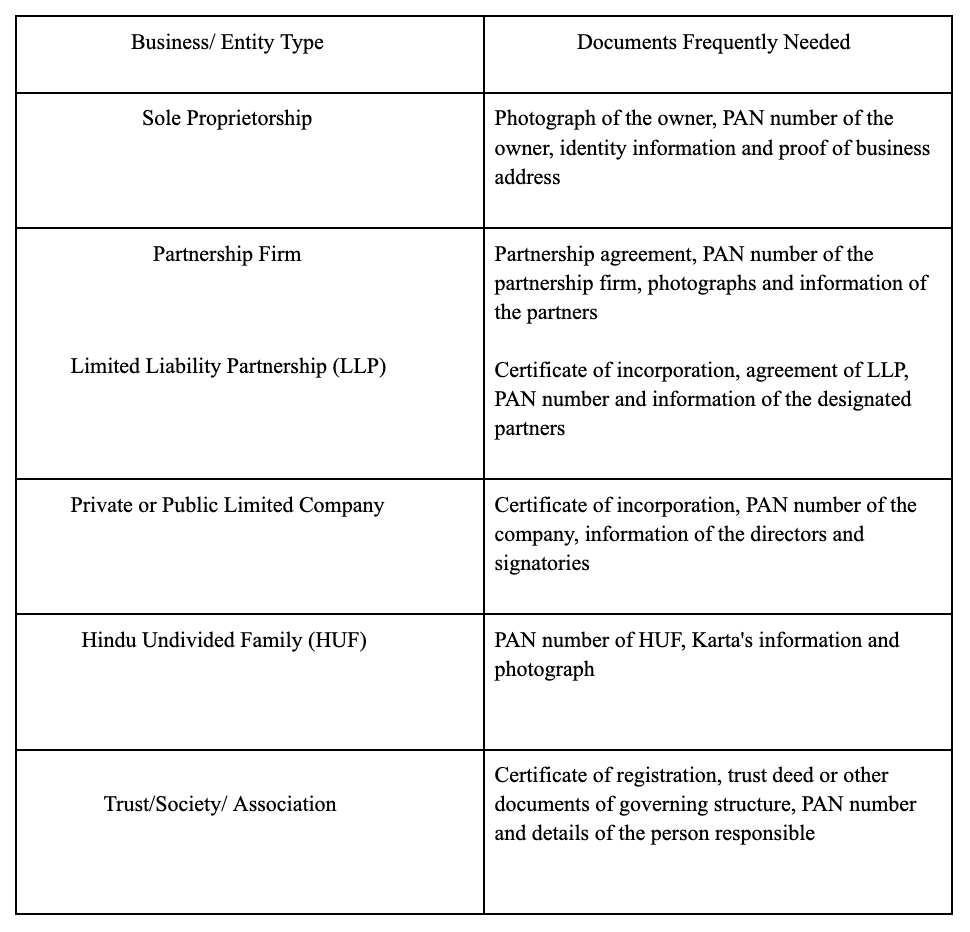
The GST portal requests information about promoters or partners, authorized signatories, and the primary place of business, depending on the constitution of the applicant.
Proof of primary place of business:
The primary place of business is the main place from which the business operates.
It is required that applicants provide the necessary proof of the ownership or use of the premises.
Some examples are as follows:
For owned property:
Electricity bill.
Municipal tax bill.
Property tax bill or any other accepted ownership document
For rented or leased property:
A valid rental or lease agreement.
The supporting ownership document of the landlord, if required.
For shared or consent-based property:
The No Objection Certificate (NOC) or consent letter.
Supporting ownership proof of the person giving consent.
The address given in the application needs to be in line with the supporting documents. A common reason for GST registration queries is that the address proof submitted is not complete or consistent.
3. How to Register for GST Online: Complete Procedure Explained
The submission of fresh registration requests takes place through the electronic form GST REG-01 available on the official GST site.
All applications can be separated into Parts: Part A and Part B.
Step 1: Open the GST Site
Visit the official website: https://www.gst.gov.in/
Follow these directions:
Services → Registration → New Registration
Select the New Registration option to start the procedure.
Step 2: Finish Part A of the GST registration application
In Part A, you need to provide the necessary information so that the registration starts.
This section of the application requires:
Type of taxpayer.
State and district.
Legal name of the business written in PAN.
Permanent Account Number (PAN).
Email ID of the Primary Authorised Signatory.
Mobile number of the Primary Authorised Signatory.
After entering the information, you need to enter the CAPTCHA and click on Proceed. GST portal will generate different OTP to the mentioned email ID and mobile number which you need to validate so as to proceed further.
Once your entry is verified successfully, the system will generate a Temporary Reference Number (TRN).
The TRN will be sent to the email ID and mobile number mentioned. The TRN helps you to access your saved application at the end of Part B.
Step 3: Utilize the TRN to enter the application
Go back to the GST portal and proceed to:
Services → Registration → New Registration
Select the Temporary Reference Number (TRN) option.
Input the TRN along with the CAPTCHA, and then perform OTP verification.
The application shall be displayed on the portal, and you should select the Edit option.
TRN is a temporary number and does not represent a GSTIN. Currently, the GST portal allows a 15-day period within which the application has to be submitted.
Step 4: Fill Out Part B of the GST Registration Application
Part B has all the necessary information related to the registration procedure.
Various sections are included in the application:
1. Business Details
Fill in the trade name, business structure, date to start the business, date of registration and reason for registration. The legal name should be the same as in the PAN database. Trade name may differ from the legal name.
2. Owners or Partners
Provide all the necessary PAN, Aadhaar and resident identity information of the owners, partners and directors or any stakeholders.
3. Authorized Representative
Fill in the name of the representative to deal with GST-related issues for the business.
4. Principal Place of Business
Fill in the address of the primary business location and upload the required proof of ownership.
5. Other Locations of Business
Enter other locations, including branches and offices in the state.
6. Goods and Services
Give information about the goods and services offered by the business along with necessary HSN or SAC classifications.
4. A Brief Guide to TRN, Aadhaar Authentication, and ARN
While applying for GST online, three terms are vital: TRN, Aadhaar authentication and ARN.
Each of these terms is essential for a different stage of the application process.
TRN or Temporary Reference Number
TRN is generated when applicants check all particulars given in Part A of the application, and the details are verified. In addition, possessing a TRN enables applicants to access their saved application and proceed to Part B.
However, it should be noted that a TRN does not qualify as proof of GST registration, and simply obtaining a TRN does not mean that the business will be assigned a GSTIN.
What is Aadhaar authentication within the context of GST registration?
Aadhaar authentication is a process of identity verification of the relevant promoters, partners, and authorized signatories depending on the route of application and verification.
In case the OTP-based method of authentication is applied, an authentication link will be sent to the relevant individuals by their registered means of communication, and OTP verification will be completed via their Aadhaar credentials.
Some applications may be chosen for biometric authentication and document verification at the GSK.
If this happens, the relevant individuals will need to make sure to book an appointment for the verification.
If biometric or document verification is not performed within the required period, ARN generation may not take place.
What do you mean by Application Reference Number (ARN)?
ARN is generated after the submission of the application and completion of necessary verification processes.
ARN acts as the reference number to track the applications.
The applicants can check the status by going to the path:
Services – Registration – Track Application Status
The application can be displayed in statuses like pending, approved or rejected.
When the application is approved, a GST registration certificate is issued in the GST REG-06 form, and the GSTIN number is allotted to the business.
5. How to Deal with GST Clarification Notices.
The submission of the GST registration application does not guarantee the acceptance of the registration form. The tax officer may scrutinize the application and its attached records. If the information is not sufficient, contradictory, or further clarification is needed, the applicant is going to receive a notice in the GST REG-03 form.
Receiving a clarification message does not mean that the application is rejected. This means that the officer requires additional documentation.
Reasons for GST Clarification Notices
There are different reasons that lead to GST Clarification Notices. Some of them are:
Absence of clear proof regarding the principal place of business.
A mismatch between the place of the GST-registered address and documents given in uploads.
Wrong PAN details.Missing partnership deed and incorporation papers.
Insufficient details of key persons (like promoters and authorized signatories).
Missing ownership, rental agreements, or consent documents.
Incomplete Aadhaar or biometric details.
Response to a GST Clarification Notice
Usually, the applicant has to respond to the notice electronically in Form GST REG-04 within 7 days of receipt of the notice.
In general, it should include:
A careful reading of each point of clarification
Understanding what documents/information is sought
If any errors in the application, correction wherever permitted
Any relevant document/ evidence needs to be attached
A clear response
The submission of the response to the notice on time
When could a GST registration application be turned down, and why?
If the applicant fails to reply to the query within the specific time limit, or the officer is not pleased with the reply provided, the application may get rejected through Form GST REG-05. Applicants are required to carefully analyze the order of rejection and comprehend the grounds for refusal.
In case of confusion, professional assistance may be useful in understanding whether a new application needs to be submitted or some other legal action is needed.
6. The First Login into GST Portal: Setup of Username and Password
After the application form for GST registration is approved, the business can proceed to use its account on the GST portal. The portal shares the pertinent registration and login details with the registered contact(s).
To log into the portal for the first time, the taxpayer should:
Navigate to the official GST portal.
Click on the Login option.
Select the First Time Login function if applicable.
Enter the temporary credentials provided to the authorised signatory.
Follow the directions on the portal for creating the username and password.
Log in again once the credentials have been updated.
The taxpayer should check their dashboard along with their registration details.
All businesses should practice safeguards to keep their credentials safe and avoid unnecessary sharing of information.
Post-registration update of bank account details
Bank account details are usually not asked as a compulsory element of the application in the registration stage.
However, as per Rule 10A of the CGST Rules, the eligible taxpayers are required to provide their bank account details within a stipulated period after registration.
The GST Portal may prompt the taxpayer to file a non-core amendment to provide this information.
The business has to ensure that the bank account details given are correct, and the account is linked to the registered entity accurately.
Non-compliance with applicable bank account requirements can lead to further steps being taken with respect to compliance.
7. Procedure for Adding a New Place of Business in GST
Many businesses expand in terms of presence with new offices, branches or warehouses over time. In case the new business locations fall in the same state, then they can easily be added under the additional place of business category.
The procedure involved for an existing GST taxpayer is:
Sign in to the GST portal.
Go to Services → Registration.
Choose the Amendment of Registration option.
Go to the relevant business address section.
Provide the new address and related information.
Upload the required address proof.
Complete the verification and submit the application form.
If the new place of business requires documentation, then proper documentary proof needs to be presented.
Recent update: The process for amending GST registration has now changed. According to the Ministry of Finance’s FAQs of October 2026, amendments regarding additional places of business are categorized under non-core and will be automatically processed through the portal.
8. GST Registration for Businesses Operating in Multiple States
Businesses operating in multiple states require separate GST registration in each state, if required, from which they make taxable outward supplies or intend to make taxable outward supplies.
Thus, a company operating in Telangana, Karnataka and Maharashtra needs to be separately registered for GST in each of these states.
The various registrations are linked with the same PAN but have a different GSTIN.
A multi-state business must keep proper state-wise records of the following:
Places of business (i.e. main and additional places of business).
GSTIN for each state.
Intra-state supplies and inter-state supplies.
Tax invoices and applicable tax rate.
Input tax credit and related adjustments.
Filing of GST returns.
Transfers between branches or stock transfers, if necessary.
One GSTIN cannot be presumed to cover all locations in India.
Is it possible for a business to obtain several GST registrations within the same state?
The answer is yes. As per the relevant GST provisions, a person may apply for multiple registrations in respect of different places of business within the same state, subject to certain prerequisites being met.
The businesses concerned need to find out which alternative would be a better choice with regard to the applicable operating system and compliance requirements.

Find your gap before month-end
We'll reconcile one month of settlements against your orders. No commitment.
9. Core and Non-Core Amendments in GST Registration
Changes in business information may occur after GST registration. Businesses may change their trade name, update business locations, open new branches, etc.
Such changes should be reported through the GST portal as amendments.
What does core amendment mean?
Core amendments involve critical details in the registration process that must be subjected to more scrutiny. Before the changes to the process made in October 2023, the address of Principal Place of Business was considered a core amendment for every registration except those covered under Rule 14A of CGST Rules.
In cases of Rule 14A, amendments to the address of the Principal Place of Business are made likewise and do not require any approval.
What are non-basic alterations?
According to the Ministry of Finance's FAQs from October 2026, the following modifications are now classified as non-basic alterations and are automatically carried out through the GST website:
Change in the business’s legal name.
Alteration in the business’s constitution.
Inclusion or modification of a secondary location of the business.
Other relevant registration information.
For GST registrations done as per Rule 14A, modifications in the Principal Place of Business are also included in the automatic non-basic process.
How to register alterations in GST?
The typical steps are as follows:
Log in to the GST portal.
Go to Services → Registration.
Choose Amendment of Registration Core Fields or Amendment of Registration Non-Core Fields depending on the situation.
Contact the relevant page.
Modify details and upload the necessary supporting documents.
Perform the verification and submit the form.
The key point to keep in mind is that if the company changes its business constitution and requires a new PAN, then it will have to apply for fresh GST registration instead of making a mere amendment. Businesses need to look at the latest workflow before submission, as the classification and processing have undergone changes.
10. Process of Cancelling GST Registration
There may exist circumstances in which an organization no longer requires a GST registration.
Reasons hereof may comprise:
Complete closing or discontinuing of business operations.
Transfer of business.
Merging, amalgamation, or demerger.
Business structure change along with PAN shifting.
Business not liable for GST registration any longer.
Users eligible for cancellation can do it online through Form GST REG-16.
Steps involved in cancelling GST registration
Go to the official GST portal and log in there.
Move to Services→ Registration section.
Click Application for Cancellation of Registration.
Open Section GST REG-16.
Choose a reason for cancellation.
Enter the date starting from which cancellation is sought.
Provide the necessary details of the closing stock and liabilities.
Perform verification through DSC or EVC.
Submit the application.
The application must usually be filed within 30 days of the event that triggered the cancellation requirement, barring relevant provisions.
What happens after submitting an application for cancellation?
The cancellation application is processed according to the relevant GST rules. After approval, the taxpayer receives a prescribed order, and the status of registration is changed accordingly.
Businesses must also satisfy all compliance requirements.
These requirements may include:
Filing all the GST returns that have not been filed.
Making payment of any outstanding taxes, interest, and penalties related to the cancellation.
Establishing liability in respect of closing stock and capital goods.
Filing final return in Form GSTR-10 in case such return is applicable.
Update of October 2026: According to the notification released by the Ministry of Finance, it will introduce a step-wise cancellation process. Thus, under Phase 1, the eligible applications for cancellation can be accepted automatically if all pending returns are submitted and amounts due are paid. Additionally, the criteria provide for evaluating the amount of ITC passed on to the applicant and submission of the GSTR-10 final return within such time period as prescribed by the authorities.
Final Thought: Ensure GST Registration is in Order Before Business Growth
GST registration differs from having an administrative process done once. Once completed, registration will be the basis for taxation, invoicing, claiming input tax credit, reporting and establishing ongoing compliance with tax obligations.
Various stages, ranging from knowing what the relevant turnover limit is to preparing documentation, filling in Part A and Part B, following the ARN and dealing with clarification requests, require correct information.
For companies being engaged in multi-state operations and having several GSTINs, keeping their registrations up to date is also critical.
Smooth GST registration process helps businesses to avoid unnecessary clarification requests and start tax compliance processes easily.
Make sure that your business GST registration and any required legal filings change depending on the company's development.
Want to get help with GST registrations? Collaborate with compliance and accounting professionals to get all GST documentation done correctly.
FAQs
1. What steps do I need to follow to get GST registration through the Internet in India?
You will have to visit the official GST portal and follow the link Selection Services → Registration → New Registration. Apply by completing Part A first, generating your temporary reference number in the process and then completing Part B by uploading related documents, completing authentication, and submitting the application.
2. Are there certain documents that are required to apply for new GST registration?
The most vital documents include PAN, photographs and identity details of the proprietor or shareholders, proof of the business type either sole proprietorship or partnership and proof of the location of the business. The set of documents will slightly change depending on the legal identity of the business.
3. How does ARN differ from TRN?
The TRN is assigned after part A is processed, allowing users to access the application, while the ARN is assigned after the successful completion of the application process.
4. Duration of GST registration?
The duration of GST registration varies with the type of application and authentication needed. If the registration requires verification by the tax officer, it may take a longer time to process.
5. Is it possible for any business to have many GST registrations in India?
Yes, a business that operates in different geographical states may obtain a separate GST registration for each state where it is required to do so. A business can also have other GST registrations for a particular state depending on the state laws.

Amulya leads GTM and customer discovery at LightHaus. She is the authority on what exactly the market needs with respect to their financial operations and effectively translates that internally in LightHaus to ensure that the offering delivers high value to our clients
Get in Touch
We get back to you within 24 hours